Manage your commercial accounts more easily.

Learn the steps to log in to the platform.

This guide will show you an overview of what Popular Business Access has to offer.

Learn how to update your password if you have forgotten it.
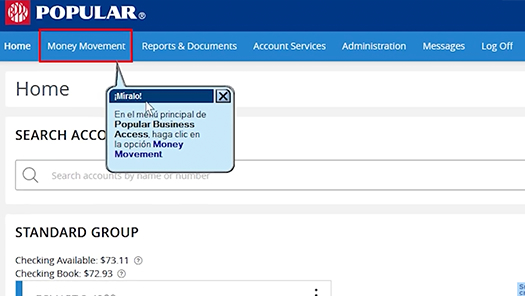
Through Popular Business Access you can transfer money between your business accounts.

Learn how to create, edit, and delete recipients for payroll and vendor payments, among others.

Group your recipients in a template to make your ACH payments.

Learn how you can make tax payments to agencies.

Through Popular Business Access you can create and generate reports based on your needs.

Learn how to access the Activity Center where you will be able to see: Report Summary and filter transactions, among others.

Learn how to create a request to stop paying one or more checks.

As a Primary User, learn how to create roles and new users.

Change your account preferences, such as: Assigning an alternate name or nickname to each account and selecting the balance information to display on the home page.

The platform provides the option to receive notifications according to the activity of your accounts, whether it be balances and transfers, among others.

Learn how to access the transaction activity of your accounts.
Product offered by Banco Popular de Puerto Rico. Member FDIC, except BVI. Popular Business Access consists of various modules that can be acquired based on the needs of your business. Each module entails different fees, which may vary based on the modules selected. For additional information on the costs, contact your relationship officer or the Business Banking Center at 787-756-3939 or 1-855-756-3939. This service is not available in countries that are subject to the U.S. Treasury Office of Foreign Assets Control (OFAC), commercial embargoes or economic sanctions.